Volume Calculator
Use the Volume Calculator to calculate boxes, rooms, pools, tanks, concrete, mulch and common 3D shapes, with instant unit conversions.

Volume Calculator
Choose a shape, enter the measurements, and get clear volume conversions without doing the formulas by hand.
Box / Rectangular Prism Volume
Cube Volume
Cylinder Volume
Cone Volume
Sphere Volume
Room Volume Calculator
Pool Volume Calculator
Concrete Volume Calculator
Mulch / Soil / Gravel Volume Calculator
Tank Volume Calculator
Volume Calculator Result
Formula Used
Step-by-Step Calculation
How to get a reliable result with the Volume Calculator
Volume tells you how much three-dimensional space something holds or occupies. The arithmetic is usually simple; the part that causes mistakes is mixing units or measuring the wrong dimension. This guide keeps those steps practical.
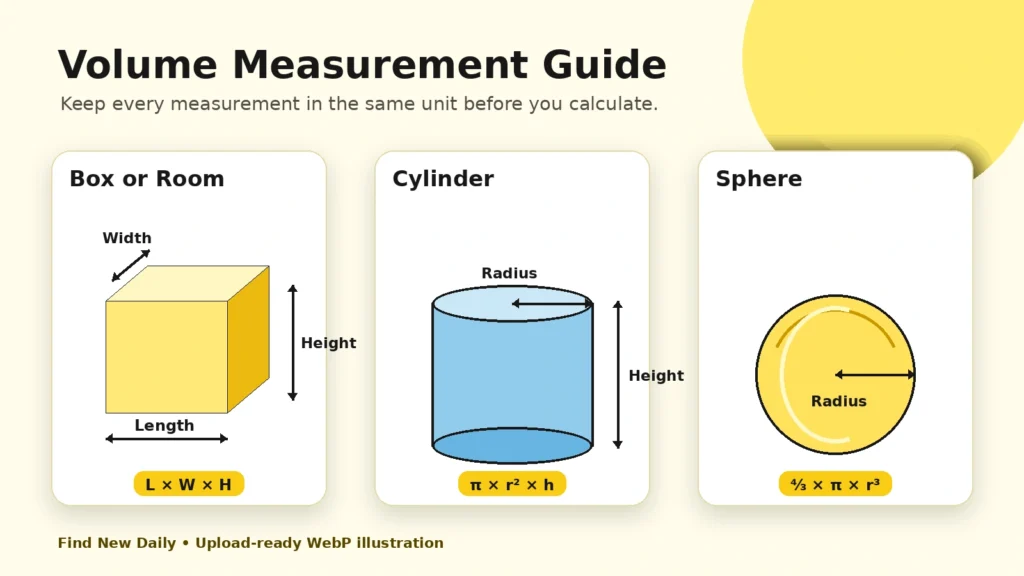
Measure once, then check once
For a box or room, use the inside length, width and height when you need usable capacity. For a cylinder, measure the radius from the center to the edge, or select diameter if you measured all the way across. For pools and tanks, an average depth usually gives a more realistic estimate than using only the deepest point.
Keep all inputs in the unit selected above. The calculator converts the final result into cubic feet, cubic yards, cubic inches, gallons, liters and cubic meters.
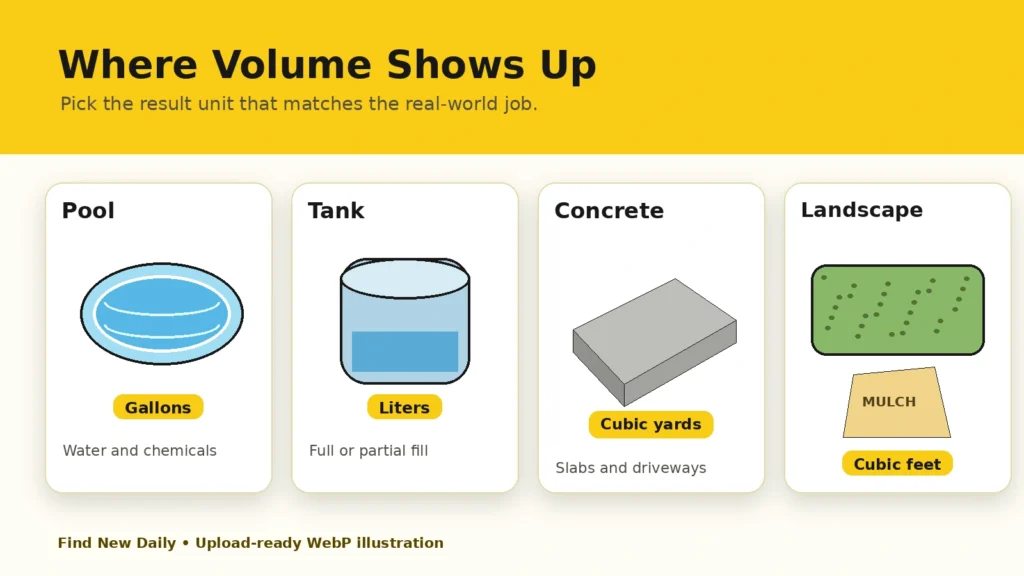
Choose the output that matches the job
Cubic feet are useful for rooms and storage. Cubic yards are easier when ordering concrete, soil, mulch or gravel. Gallons and liters make more sense for pools, aquariums and water tanks. The same measured space can be shown in all of these units, so use the one your supplier or project instructions require.
Read the full volume guide
Basic formulas used by this calculator
- Box or room: length × width × height
- Cube: side³
- Cylinder: π × radius² × height
- Cone: ⅓ × π × radius² × height
- Sphere: ⁴⁄₃ × π × radius³
A useful rule for material orders
Concrete and landscaping projects rarely match a perfect rectangle. Small dips, uneven ground, spills and compaction can increase the amount required. The waste or extra-material setting adds a practical buffer. Ten percent is a common starting point, but your project may need more or less.
Quick conversion reference
| Starting unit | Equivalent | Often used for |
|---|---|---|
| 1 ft³ | 1,728 in³ | Boxes and storage |
| 1 yd³ | 27 ft³ | Concrete and landscaping |
| 1 ft³ | 7.48052 US gal | Pools and tanks |
| 1 ft³ | 28.3168 L | Liquid and metric planning |
| 1 m³ | 1,000 L | Metric projects |
Before relying on the number
This calculator is intended for planning and estimation. For structural work, commercial orders, hazardous liquids or expensive materials, confirm the measurements and any supplier-specific requirements before purchasing.
Volume Calculator questions people often ask
How do I calculate the volume of a box?
Multiply the inside length by the inside width and inside height. Keep all three measurements in the same unit.
How many cubic feet are in one cubic yard?
One cubic yard contains 27 cubic feet. Divide cubic feet by 27 to convert the result to cubic yards.
How are pool gallons estimated?
The pool shape is calculated in cubic feet first, then multiplied by 7.48052 to estimate US gallons. Irregular pools may require an average of several measurements.
Should I add extra material for concrete, mulch or gravel?
Usually yes. A small buffer helps cover uneven surfaces, compaction, spills and measurement differences. Use the percentage control to match your project.
Can I calculate a partly filled tank?
Yes. Choose the tank shape, enter its dimensions and set the fill percentage. The result shows the estimated occupied volume rather than only full capacity.
Why can my real-world result differ from the calculator?
Objects and project areas are not always perfectly shaped. Rounded corners, slopes, wall thickness, settling and measurement error can change the usable volume.