Enter a list of numbers and Mean Calculator will calculate the arithmetic mean, sum, count, range, median, and mode. You will also see the working, so the result is easy to check.
Separate values with commas, spaces, or line breaks. Decimals and negative numbers are supported.
Calculation steps
Open the weighted mean calculator
Use weights when one score or value should count more than another, such as exams, quizzes, assignments, or investment returns.
Value
Weight
Action
Weighted mean steps
Quick guide
How to use Mean Calculator
Paste your numbers into the box, choose how many decimal places you need, and select Calculate Mean. The result panel shows the average first, followed by the sum, count, minimum, maximum, range, median, and mode.
The calculation stays in your browser. Nothing is submitted when you press the button, so you can test another data set immediately.
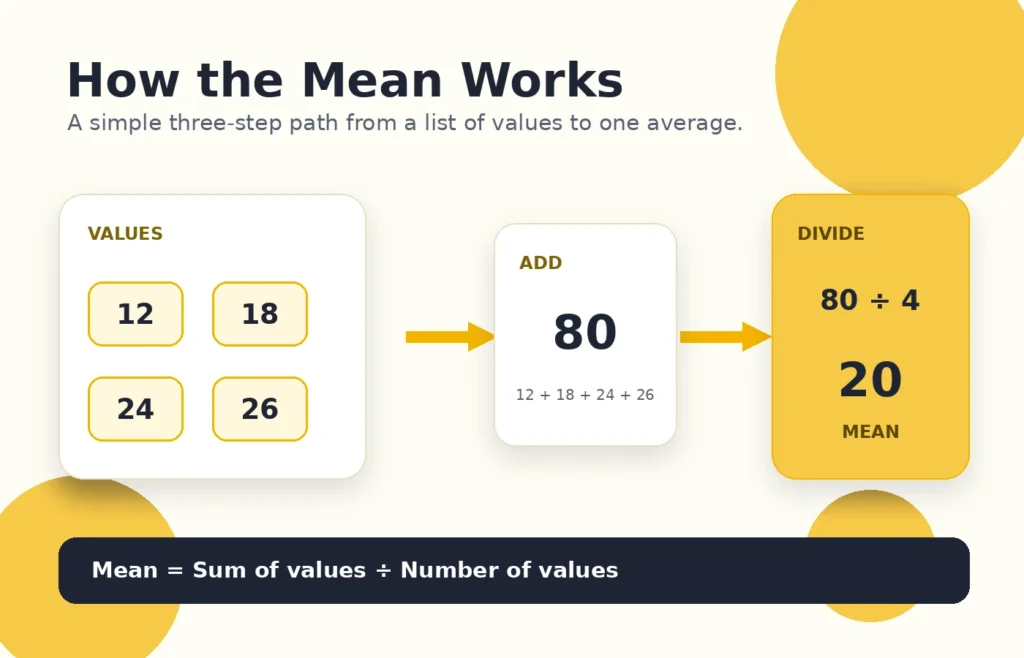
Add the values, count them, and divide the sum by the count.
1. Enter valuesUse commas, spaces, or separate lines.
2. Choose roundingKeep the full answer or select decimal places.
3. Check the workRead the result and calculation steps.
About Mean Calculator
The arithmetic mean is the value most people call the average. It is useful when one number needs to represent a complete list, such as test scores, weekly expenses, delivery times, temperatures, or sports results.
Read the complete mean guide
What does the mean tell you?
The mean shares the total equally across every value in the list. For example, if five days of spending add up to $150, the mean daily spending is $30. It does not mean you spent exactly $30 every day; it gives you one central value for the full period.
Arithmetic Mean = Sum of all values ÷ Number of values
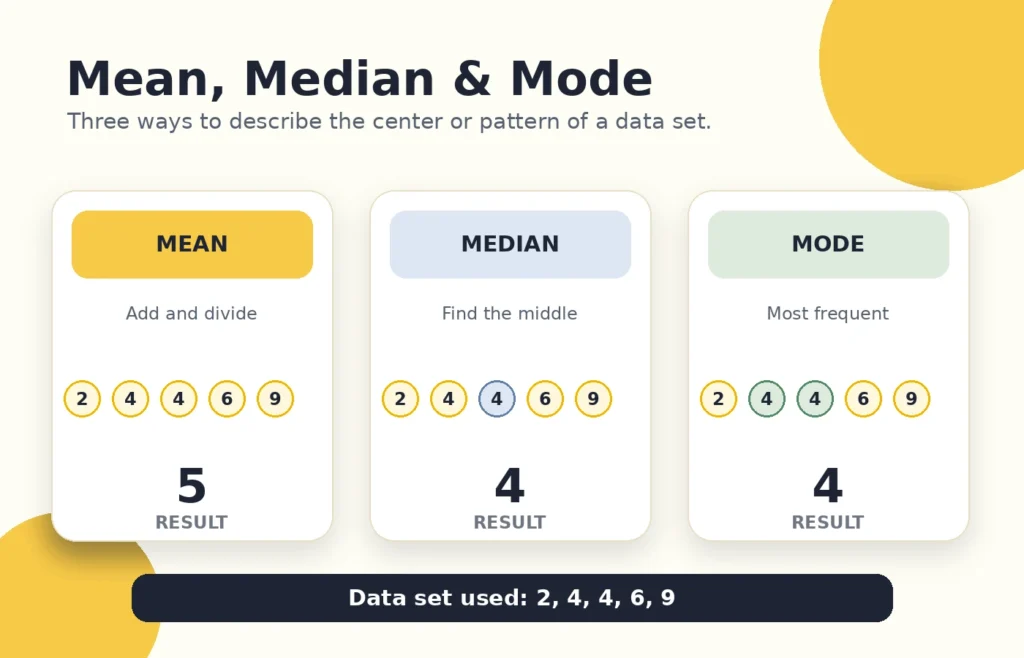
Mean, median, and mode describe a data set in different ways.
Mean, median, and mode are not always equal
Mean is the arithmetic average. Median is the middle value after sorting the numbers. Mode is the value that appears most often.
In the list 2, 4, 4, 6, 9, the mean is 5, the median is 4, and the mode is 4. A very high or very low outlier can pull the mean away from the rest of the data, which is why the median is sometimes more representative.
When a weighted mean is better
A simple mean treats every value equally. A weighted mean is better when some values matter more. A final exam worth 50% of a grade should influence the result more than a quiz worth 10%.
Weighted Mean = Sum of (value × weight) ÷ Sum of weights
Common mistakes to avoid
Dividing by the wrong number of values.
Leaving out a repeated value.
Dropping a minus sign from a negative number.
Rounding each value before finishing the calculation.
Using a simple mean when the values have different weights.
Practical uses
You can use this calculator for grades, household spending, work hours, fitness records, travel times, sales totals, temperatures, sports statistics, or any other list where an arithmetic average is useful.
The mean is the arithmetic average. Add all values and divide the result by the number of values.
Is mean the same as average?
In basic math, “average” usually refers to the arithmetic mean. In statistics, average can sometimes be used more broadly for different measures of central tendency.
Can the mean be negative?
Yes. The mean is negative when the sum of the values is negative.
How are repeated numbers handled?
Every appearance is included. In 5, 5, 10, both 5s are part of the sum and the count.
What happens when there is no mode?
When no value repeats more often than the others, the result panel displays “No mode.”
Can I use this calculator for grades?
Yes. Use the standard calculator for equally weighted scores and the weighted section when exams, quizzes, and assignments have different percentages.
Does the calculator support decimals and negative numbers?
Yes. Enter decimals and negative numbers in the same list as whole numbers.
Why can the mean be misleading?
An unusually high or low value can pull the mean away from most of the data. In that situation, compare it with the median.